
VectorCat
-
Posts
1,002 -
Joined
-
Last visited
Everything posted by VectorCat
-
Section Naming problem?
VectorCat replied to VectorCat's topic in Affinity on Desktop Questions (macOS and Windows)
That worked like Magic. Thank you MikeTO! -
Section Naming problem?
VectorCat replied to VectorCat's topic in Affinity on Desktop Questions (macOS and Windows)
I can. Thank you for looking at it. Section Problem.afpub -
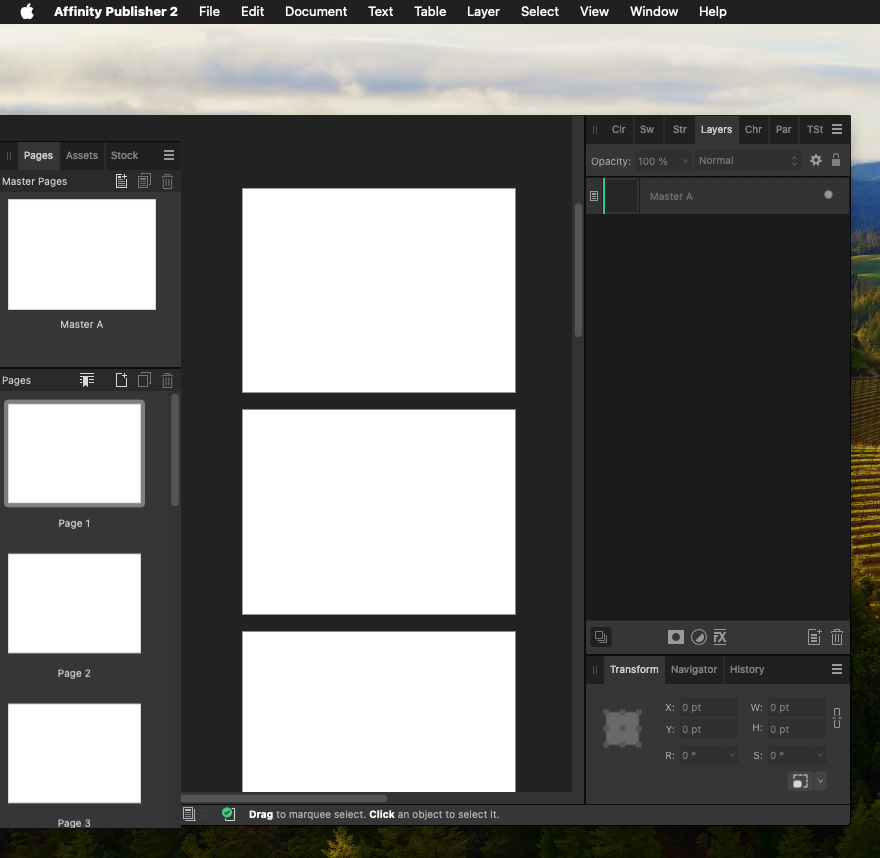
Screen capture shows first 2 pages of a document which both have Same Master applied to them. Page 1 shows correct section: "Section One." Page 2 shows "Section Name" not "Section One." Any clues on why? Thank you!

-
The video tells the story. If I'm doing something wrong procedurally, I'm not seeing it. Thank you in advance. no_noise.mov
-
My video workflow if 4k. Is there any advantage to working im QFHD at higher-than-72dpi, say 600, 1200 dpi, for use in print? Would the higher resolution matter for video? Thank you
-
Any suggestions on how to age people in photos? I have a photo for a design which is nearly perfect, but the person in the photo looks a bit too young. It's also a side shot in bright sun, so...maybe not a lot of shadowing opportunity there. Thank you for any clues.
-
Sure enough! Excellent to know..thank you!
-
🙃 Photo persona. Switching back to Pub persona restored the razorness of the type. Thank you. But, why wouldn't type in Pub persona still be sharper than that in photo persona? 150% isn't that much of a zoom factor. Does Photo re-interpret type at screen rez? Thank you again..
-
Does Publisher 2 for Mac have a limitation which Designer 2 does not have in terms of keeping type sharp no matter how much you zoom in? In Designer 2, live type is crisp no matter how far I zoom in, but in Publisher 2, live type gets jagged at 150% zoom! and to be clear, what I mean by "live type" is type which has not been rasterized or converted to curves, and is selectable and editable AS type. Thank you for any clues
-
Thank you, DWright
-
when I am working with text…modifying, formatting, scaling, etc., I want the keyboard out of my hair until I’m ready to type, but it keeps sliding up to help me anytime I do anything text-related. Is there a way to get the keyboard to give me the little widget to keep the full keyboard out of the way…the way it is in publisher 2? thank you
-
Ah..that works...very helpful, thank you! My bad for reading too hastily!
-
When I undock the desired pallets and then hide studio, all pallets disappear.
-
thank you, thomaso...this doesn't seem to be working for me...is this an iPad feature?
-
Thanks, Walt..good to have that confirm. Sounds like Presets could be the salvation.
-
Maybe this is a feature, but it feels like a nasty bug. If I Hide Studio, I may want to clear up the interface visually, but I don't want to lose all functionality. Is this our choice? I want and need to be able to make all the tool palettes go away, but I also, equally need to be able to summon certain things back, whenever I need to. For example: hide all the tool palettes, but let me pull up the layers pallet when I need to see what's on the layers, or the text frame pallet when I need to do something to a text frame. Thoughts?
-
excellent strategy..thank you!
-
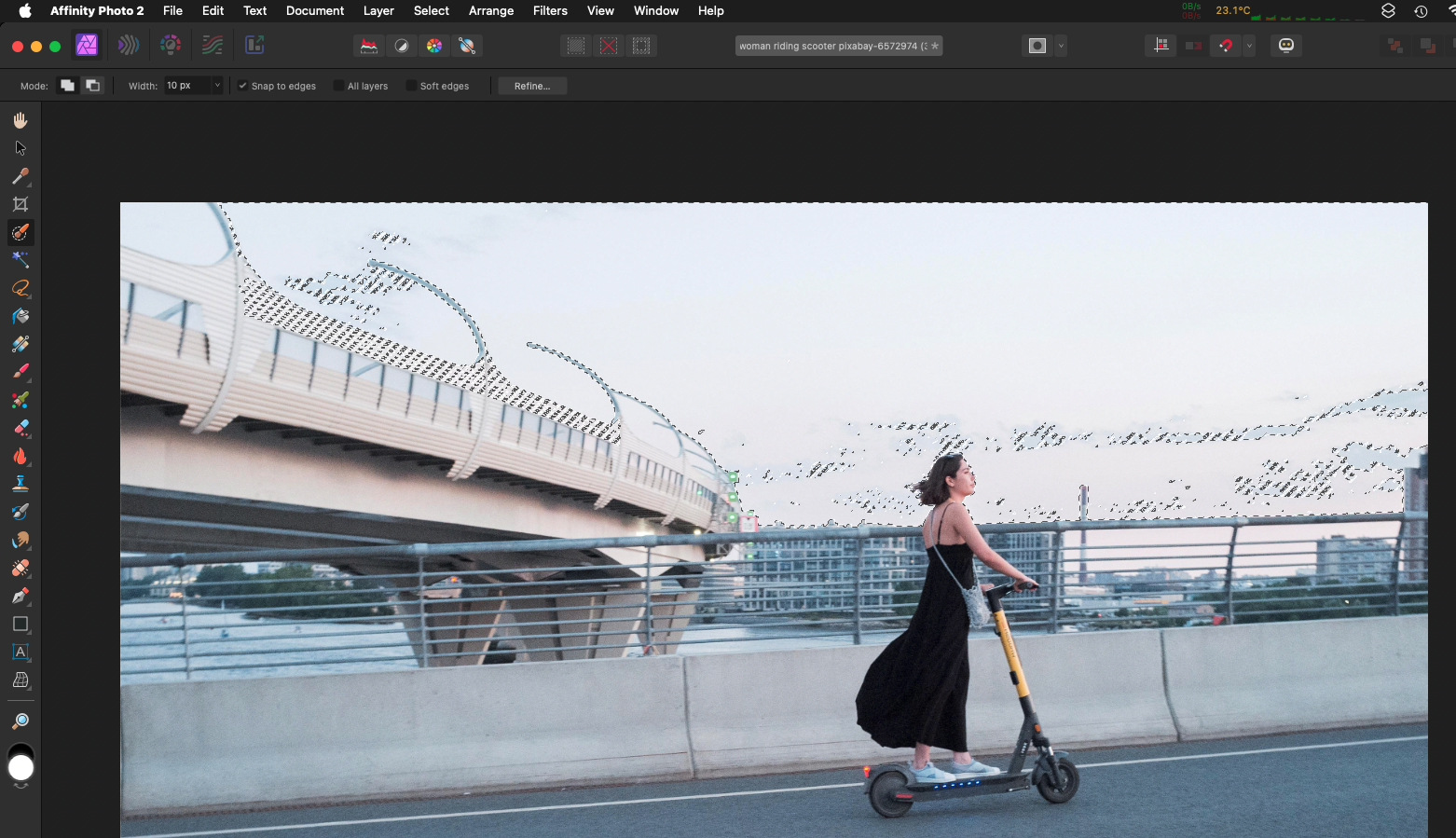
This is an image I downloaded from Pixabay. As you can see, I've made a selection of the sky using the Selection Brush Tool, and it's pretty good, except that many of the non-sky elements which border the sky are similar saturation and color. Some of the areas like the guardrail of the curved bridge, upper left relative to the woman, are intricate; crude selection will produce a crude result: I want to replace the original sky with something more blue and dramatic. Is this the best I can do with this tool, and should I next make my selections and de-selections manually? Thank you
-
selecting words is easy; inserting the type cursor in between words or characters is frustrating because Publisher seems primed to select words. Is there a way to insert the text cursor between characters and words straight away without selecting entire words or groups of words? Is this a deficit/limitation of iPad OS? thank you EDIT: May have discovered an answer: settings > accessibility > switch control > selection mode > precise
-
Toggled the toolbar, reset the studio, rebooted the Mac. Problem seemed to go away of it's own. Thank you for the suggestions. This is a problem I've had perhaps 1 other time. Rare.
-
I upgraded to Sonoma today and I did all three Affinity upgrades as well. Did a quick thing in publisher during which I was in tile left mode with a finder window tile right. after exiting tile mode, Publisher lost its window chrome. Restarting the mac didn't help. Anyone else with this problem? Screen capture attached. Thanks!
-
thank you for the great suggestions!
-
The attached screenshot is of 3 “Donut” shapes created on Publisher 2 for iPad, while in Publisher persona. While I can easily make successive donuts snap one inside the other so that the outside of one falls exactly on the inside of the one around it. Are there tools to ensure that all of the donuts has the same width as the others? I can do it by eye, or I could make a little box of x-width to use as a standard, but I’m hoping there’s a tool in the software that make short and accurate work of this little task. Thank you
-
Ah..that does work. thank you!
-
why wont color replacement brush work on this image?
VectorCat replied to VectorCat's topic in Affinity on iPad Questions
Walt; While you and I as humans would say that the N95 photo is of a "white" mask, if that image were truly white, we wouldn't see anything but white. But in fact we see colors or tones that are not white - albeit very close to white. Not as colorful as a photo of an amazon parrot, but it is an RGB image and I'd think that Photo could change whatever pixels are there. Perhaps vibrant colors are required for the "Color Replacement Brush" to truly shine. If I look very closely, I can see a color of my choosing being imparted, but it's faint, probably because, as you intimated, it isn't a colorful enough image from the software's point of view..too many tones for which the R, G and B are pretty close to each other. Just thinking out loud here.. maybe PaulEC's suggestion to use the regular brush in Multiply will get me where I need to go.